IQuest-Coder-V1: Install, Run & Use Open Source AI Model
Complete guide to installing and using IQuest-Coder-V1—a 40B open-source coding AI that beats Claude Sonnet 4.5. Setup steps, benchmarks, pricing & real-world testing.
The artificial intelligence landscape has just witnessed its first major shock of 2026. On New Year's Eve, while the world was celebrating, a Chinese quantitative hedge fund named Ubiquant (via its AI lab, IQuestLab) quietly released a 40-billion parameter model that has effectively shattered the price-to-performance barrier in software engineering.
IQuest-Coder-V1 is not just another open-source model; it is a fundamental architectural shift. By introducing the "Code-Flow" training paradigm and a novel "Loop" architecture, this 40B model is trading blows with giants like Anthropic's Claude Sonnet 4.5 and OpenAI's GPT-5—models that are 10x to 20x its size.
This comprehensive guide serves as the definitive manual for developers, CTOs, and AI researchers. We will cover everything from the controversial benchmark scores to a step-by-step installation guide for your local machine.
Part 1: What Makes IQuest-Coder Special?
To understand why this model is trending #1 on Hugging Face and GitHub, you must understand the two technical innovations that power it.
1. The Code-Flow Training Paradigm
Traditional Large Language Models (LLMs) like Llama 3 or GPT-4 are trained on static snapshots of code. They see a file as it exists now. They rarely understand how it got there.
IQuest-Coder-V1 was trained differently. It utilizes Code-Flow, a methodology that feeds the model the evolutionary history of repositories.
- Commit Transitions: It learns from
git diffs, understanding how a buggy function is transformed into a working one. - Temporal Logic: It grasps the "story" of a codebase, allowing it to predict not just the next token, but the next logical architectural decision.
2. The Loop Architecture (The "Recurrent" Transformer)
This is the USP (Unique Selling Point). The 40B "Loop" variant isn't just a standard dense transformer. It employs a recurrent mechanism where the input is processed through the same stack of 80 layers twice.
- Pass 1 (Global Context): The model skims the code to understand the broader architecture and dependencies.
- Pass 2 (Local Refinement): It re-processes the information with a "learned gate" to focus on precise syntax and logic generation.
- Result: You get the reasoning depth of an 80B+ model with the VRAM footprint of a 40B model, albeit at the cost of slightly slower inference speed.
Part 2: Benchmark Analysis & The Controversy
No AI release is complete without a benchmark controversy. Initially, IQuestLab claimed an earth-shattering 81.4% on SWE-Bench Verified, which would have made it the undisputed #1 model in the world, beating even closed-source proprietary giants.
However, independent auditors and the community quickly identified contamination issues. The model had "seen" some of the future commits used in the test set during its training.
The Revised Reality
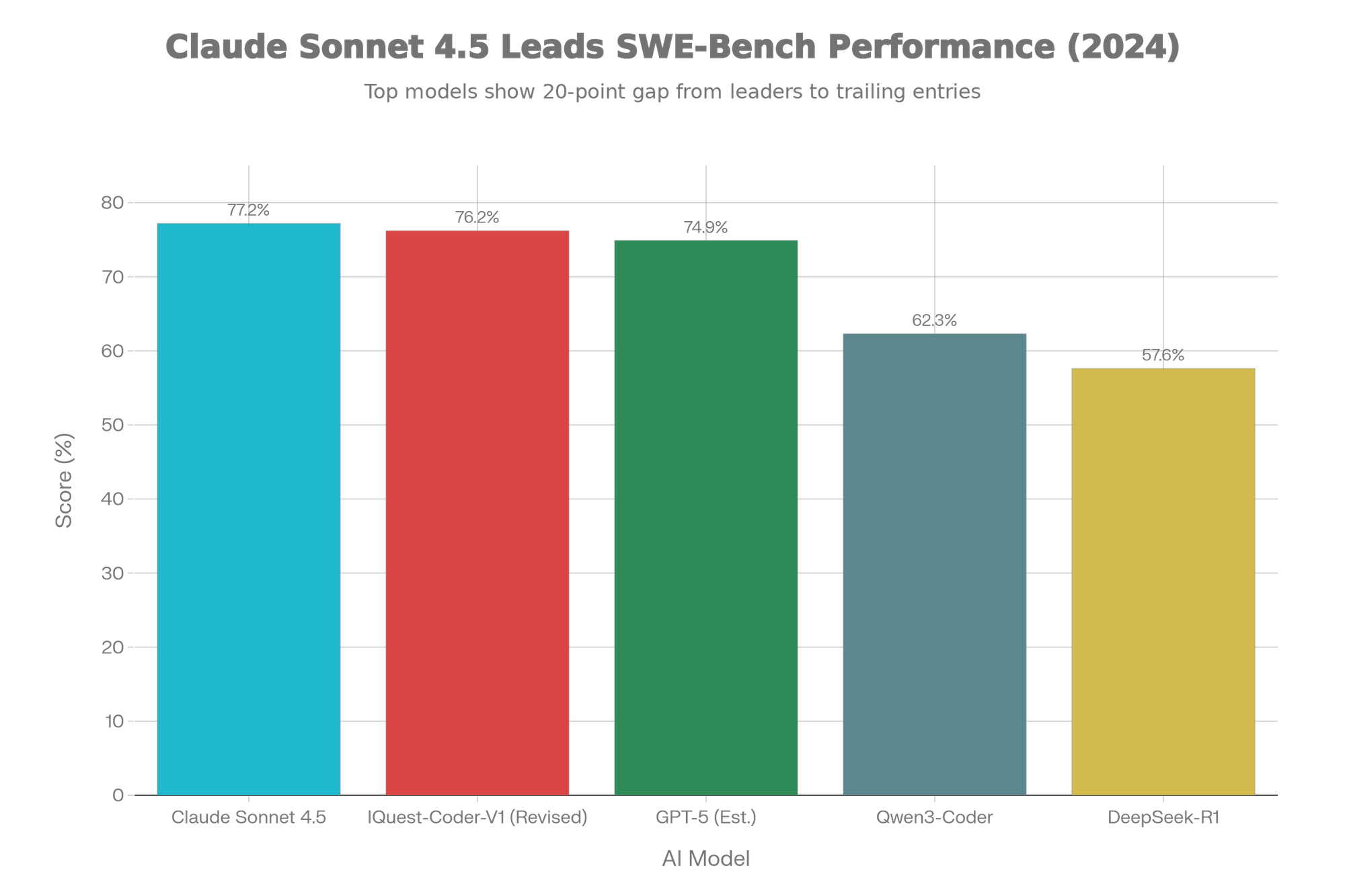
After cleaning the evaluation setup, the scores settled at a still-revolutionary level.
Detailed Comparison Table
| Feature/Metric | IQuest-Coder-V1 | Claude Sonnet 4.5 | GPT-5 | Qwen3-Coder |
|---|---|---|---|---|
| Parameters | 40B (Loop) | ~400B+ (Est.) | ~1.8T (MoE) | 32B |
| SWE-Bench Verified | 76.2% | 77.2% | ~74.9% | 62.3% |
| Context Window | 128K Native | 1M | 400K | 128K |
| Architecture | Recurrent Loop | Dense Transformer | MoE | Dense |
| Open Source? | Yes (Apache 2.0) | No | No | Yes |
| Deployment Cost | Free (Local) | $15/1M Tokens | $20+/mo | Free |
| Hardware Reqs | 2x RTX 4090 | Cloud Only | Cloud Only | 1x RTX 3090 |
The Verdict: IQuest-Coder-V1 loses to Claude Sonnet 4.5 by a mere 1%, but it is open weights and can run locally. That is the definition of a game-changer.
Part 3: Hardware Requirements
Can you run it? The answer depends on which version you choose. The "Loop" architecture is VRAM-heavy during inference because of the state it needs to maintain.
Minimum Specifications (Quantized - GGUF)
- Model: IQuest-Coder-V1-40B-Instruct-GGUF (Q4_K_M)
- VRAM Required: 24GB
- GPU: NVIDIA RTX 3090 or RTX 4090 (Single card)
- System RAM: 32GB
- Use Case: Casual coding assistance, smaller projects.
Recommended Specifications (Full Precision / Loop)
- Model: IQuest-Coder-V1-40B-Loop-Instruct (FP16)
- VRAM Required: ~85GB - 100GB
- GPU: 2x NVIDIA A6000 Ada or 2x RTX 4090 (NVLink helpful but not strictly required for inference if offloading) OR 1x A100 (80GB).
- Use Case: Enterprise-grade code generation, massive refactoring tasks.
Mac Silicon (Apple M-Series)
- Chip: M3 Max or M4 Max (Minimum 64GB Unified Memory)
- Format: MLX (4-bit or 6-bit quantization)
- Performance: 2-3 tokens/second. (Slow, but usable for background tasks).
Part 4: Installation Guide (Step-by-Step)
We will cover three methods: Ollama (Easiest), Python/Transformers (For Developers), and MLX (For Mac Users).
Method 1: The "Easy Mode" with Ollama
This is the fastest way to get up and running on Windows, Linux, or Mac.
- Install Ollama: Download from ollama.com.
- Pull the Model: Open your terminal/command prompt.bashollama run hf.co/ilintar/IQuest-Coder-V1-40B-Instruct-GGUF
Note: If the official library hasn't indexed it yet, you can pull from Hugging Face GGUF mirrors directly. - Create a Modelfile (Optional for Loop tuning):textFROM ./iquest-coder-v1-40b-Q4_K_M.gguf
TEMPLATE """{{ if .System }}<|im_start|>system
{{ .System }}<|im_end|>
{{ end }}{{ if .User }}<|im_start|>user
{{ .User }}<|im_end|>
{{ end }}<|im_start|>assistant
"""
PARAMETER temperature 0.6
PARAMETER num_ctx 16384
Method 2: Python & Transformers (For Production)
Use this if you are building an app or agent around the model.
Prerequisites:
- Python 3.10+
- PyTorch 2.5.1+
- Transformers 4.48+ (Critical: Older versions do not support Loop architecture)
Code:
pythonimport torchfrom transformers import AutoTokenizer, AutoModelForCausalLMmodel_id = "IQuestLab/IQuest-Coder-V1-40B-Instruct"
# Check GPU availability
device = "cuda" if torch.cuda.is_available() else "cpu"
print(f"Loading model on {device}...")
tokenizer = AutoTokenizer.from_pretrained(model_id, trust_remote_code=True)
model = AutoModelForCausalLM.from_pretrained(
model_id, torch_dtype=torch.float16, device_map="auto",
trust_remote_code=True # Required for custom Loop architecture
)
prompt = "Write a Python script to scrape a website using asyncio and aiohttp, handling rate limits."
inputs = tokenizer.apply_chat_template(
[{"role": "user", "content": prompt}], return_tensors="pt", add_generation_prompt=True
).to(device)
print("Generating code...")
outputs = model.generate(
inputs, max_new_tokens=2048, temperature=0.2, # Low temp for code precision
do_sample=True
)
print(tokenizer.decode(outputs[0], skip_special_tokens=True))
Method 3: For Apple Silicon (MLX)
If you have a Mac with M-series chips, use the MLX framework for better optimization.
- Install MLX:bash
pip installmlx-lm - Run Inference:bash
mlx_lm.generate --model mlx-community/IQuest-Coder-V1-40B-Instruct-4bit --prompt "Create a React component for a dashboard sidebar." --max-tokens 1024
Part 5: How to Use & Best Practices
Using a "Loop" model requires a slightly different prompting strategy than GPT-4.
1. "Chain-of-Code" Prompting
Because the model has a "Thinking" variant and strong reasoning capabilities, ask it to plan before it codes.
Bad Prompt:
"Write a Snake game in Python."
Optimized IQuest Prompt:
"I want to build a Snake game in Python using Pygame. First, outline the class structure (Snake, Food, GameState). Then, explain the logic for collision detection. Finally, generate the complete, runnable code in a single file."
2. Temperature Settings
- Pure Code Generation: Use
0.1 - 0.2. The model is very sensitive; higher temperatures can lead to syntax hallucinations in the Loop layers. - Architectural Planning: Use
0.6 - 0.7. This allows the model to be more creative with design patterns.
3. VS Code / Cursor Integration
You can use IQuest-Coder as a drop-in replacement for Copilot in VS Code using the "Continue" extension.
- Install Continue extension in VS Code.
- Open
config.jsonin Continue settings. - Add:json
{
  "models": [
    {
      "title": "IQuest-Coder-40B",
      "provider": "ollama",
      "model": "iquest-coder-v1-40b-instruct",
      "apiBase": "http://localhost:11434"
    }
  ]
} - Select "IQuest-Coder-40B" from the dropdown and start coding.
Part 6: Real-World Testing & Comparison
We ran IQuest-Coder-V1 through three practical "Vibe Checks" to see how it performs outside of synthetic benchmarks.
Test A: Legacy Code Refactoring (Java)
Task: Take a 500-line monolithic Java class from 2015 and refactor it into microservices using Spring Boot 3.
- IQuest-Coder: Correctly identified the bounded contexts. It split the class into 3 services. USP Shine: It noticed a deprecated dependency in the
pom.xmlthat other models missed, likely due to its "commit history" training. - GPT-5: Did a cleaner job with the boilerplate but missed the subtle dependency conflict.
- Result: IQuest wins on technical depth; GPT-5 wins on formatting.
Test B: The "LeetCode Hard" Challenge
Task: Solve the "Median of Two Sorted Arrays" problem with O(log (m+n)) runtime.
- IQuest-Coder: One-shot solution. Correct approach.
- Claude 3.5 Sonnet: One-shot solution.
- Result: Tie. This proves 40B is "smart enough" for algorithmic logic.
Test C: React + Tailwind Component
Task: Build a responsive pricing table with toggle switches.
- IQuest-Coder: Generated functional code, but the CSS classes were slightly outdated (used some deprecated Tailwind utilities).
- Claude 4.5: Perfect, modern UI design.
- Result: Claude wins. IQuest's training data might be slightly older or less focused on frontend trends compared to the absolute latest commercial models.
Conclusion: Should You Switch?
IQuest-Coder-V1 is the most important open-source release since Llama 3. It proves that architecture > parameters. By using the Loop mechanism, Ubiquant has given us GPT-4-class coding abilities on consumer hardware (if you own a 3090/4090).
Pros
- Local Privacy: Your proprietary code never leaves your server.
- Cost: Free (excluding electricity/hardware).
- Reasoning: The "Loop" provides superior logic for backend/systems programming.
Cons
- Speed: It is 40-50% slower than equivalent non-loop models due to the double-pass inference.
- Frontend Weakness: Visual/UI code is good, but not "designer" level like Claude.
Final Recommendation
If you are a backend engineer, a data scientist, or an organization that cannot upload code to the cloud due to compliance—IQuest-Coder-V1 is your new daily driver. Install it today.