Run Mistral DevStral 2 Locally: Complete Setup Guide 2025 | Free Open-Source AI Coding Model
Deploy Mistral DevStral 2 locally with our comprehensive guide. Learn setup, benchmarks, pricing, and how it compares to Claude & GPT-4. 256K context, 72.2% SWE-bench score, 7x cheaper than competitors.
Mistral AI has just released Devstral 2, a seismic shift in how developers approach software engineering tasks. With its December 2025 debut, this powerful 123-billion parameter dense transformer model represents the most impressive open-source coding agent available today, achieving a 72.2% score on SWE-Bench Verified—the gold standard for measuring real-world GitHub issue resolution capabilities.
For the first time, enterprises and individual developers can run a truly competitive, state-of-the-art coding model entirely on their local infrastructure, complete with comprehensive privacy, control, and cost efficiency that proprietary alternatives simply cannot match.
This article explores everything you need to know about running Devstral 2 locally, from technical requirements and setup procedures to advanced configurations, real-world testing, and how it stacks against competitors like Claude Sonnet 4.5, GPT-4, and DeepSeek V3.2.
What is Mistral Devstral 2?
The Model Family Overview
Mistral AI released two distinct variants under the Devstral 2 umbrella, each tailored for different deployment scenarios and organizational sizes:
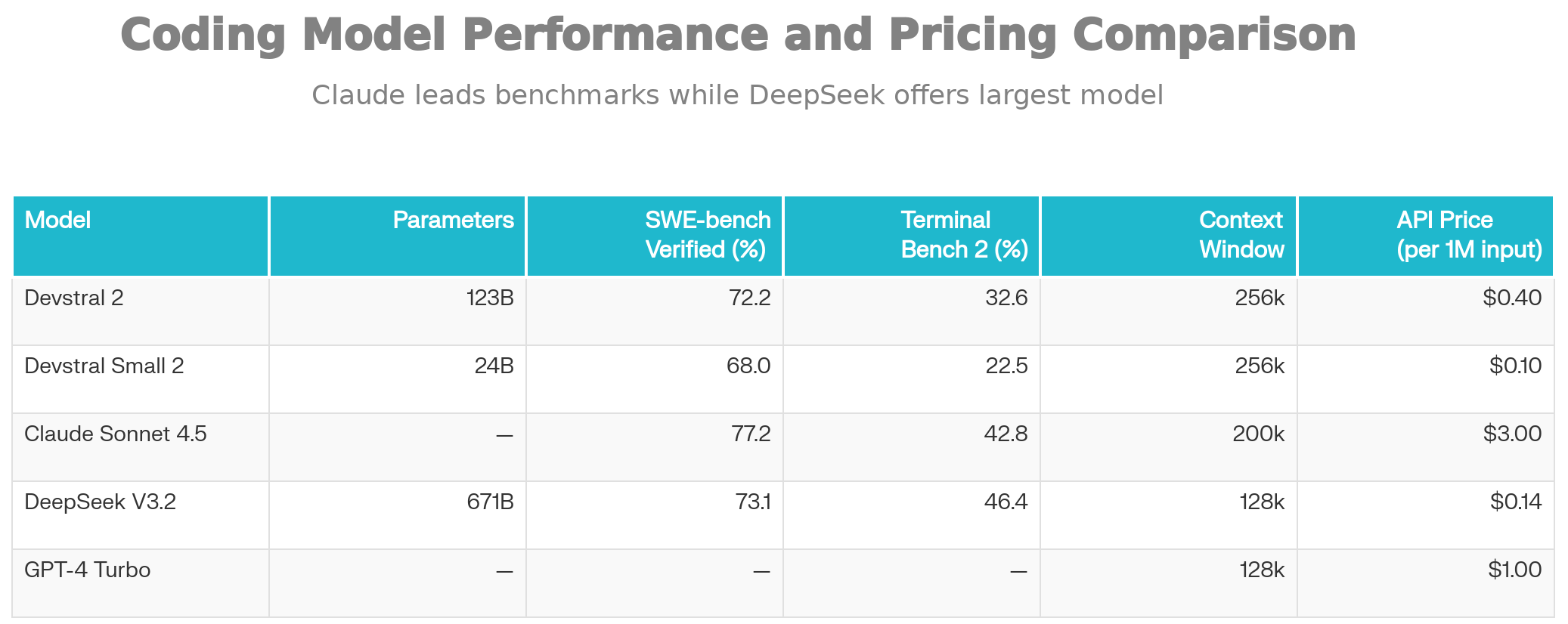
Devstral 2 (Full Model): A powerful 123-billion parameter dense transformer that excels at complex agentic coding tasks. It achieves 72.2% on SWE-Bench Verified and 32.6% on Terminal-Bench 2, making it the strongest open-weight model for autonomous code generation and repository-scale refactoring.
Devstral Small 2 (Compact Model): A lightweight 24-billion parameter variant scoring 68.0% on SWE-Bench Verified, designed for developers who want to run models directly on consumer hardware like laptops with modern GPUs or high-end CPUs.
Both models share the same 256K token context window, allowing them to ingest entire repositories and understand multi-file dependencies in a single inference pass. This extended context is crucial for real-world software engineering tasks where understanding the broader codebase architecture is essential for making correct decisions.
Technical Architecture
Unlike many recent large language models that rely on Mixture-of-Experts (MoE) architectures, Devstral 2 employs a dense transformer design with FP8 quantization. This architectural choice has profound implications: while Devstral 2 is considerably smaller than competitors like DeepSeek V3.2 (671B parameters), it delivers superior inference consistency and user experience in human evaluations. In direct head-to-head testing, Devstral 2 achieved a 42.8% win rate against DeepSeek V3.2 in real-world development tasks.
Unique Selling Points (USPs) and Competitive Advantages
1. Exceptional Cost Efficiency
Devstral 2's most compelling advantage is its cost profile. When deployed through Mistral's API, it costs $0.40 per million input tokens and $1.20 per million output tokens, making it approximately seven times cheaper than Claude Sonnet 4.5 for equivalent tasks. For heavy-use development teams running hundreds of code generation and analysis tasks daily, this translates to substantial cost savings over 12 months.
Even compared to GPT-4 Turbo (approximately $10-15 per million input tokens), Devstral 2 represents a dramatic cost reduction while maintaining competitive performance levels.
2. Open-Weight Availability
Unlike proprietary models locked behind API walls, Devstral Small 2 is released under the Apache 2.0 license, enabling unlimited commercial use, fine-tuning, and modification without licensing restrictions. This means enterprises can incorporate the model into commercial products without purchasing separate commercial licenses.
Devstral 2 uses a modified MIT license with a $20 million annual revenue cap, meaning only organizations exceeding this threshold require a commercial license. For 99% of development teams, this translates to free usage rights.
3. Local-First Privacy and Compliance
Running Devstral 2 locally provides complete data sovereignty. No code, repositories, or proprietary information ever leaves your infrastructure. This is particularly valuable in regulated industries—finance, healthcare, defense, and government agencies with strict data residency requirements can now leverage cutting-edge AI coding assistance without legal complications.
4. Agentic Coding Excellence
Devstral 2 is purpose-built for autonomous software engineering workflows. It excels at:
- Multi-file code edits and refactoring
- Codebase exploration and understanding
- Autonomous bug fixing from GitHub issues
- Cross-module dependency resolution
- Long-horizon reasoning across 256K tokens of context
This is distinct from general-purpose language models fine-tuned for coding—Devstral 2 is specifically optimized for the reasoning patterns developers use.
5. Mistral Vibe CLI: Native Terminal Integration
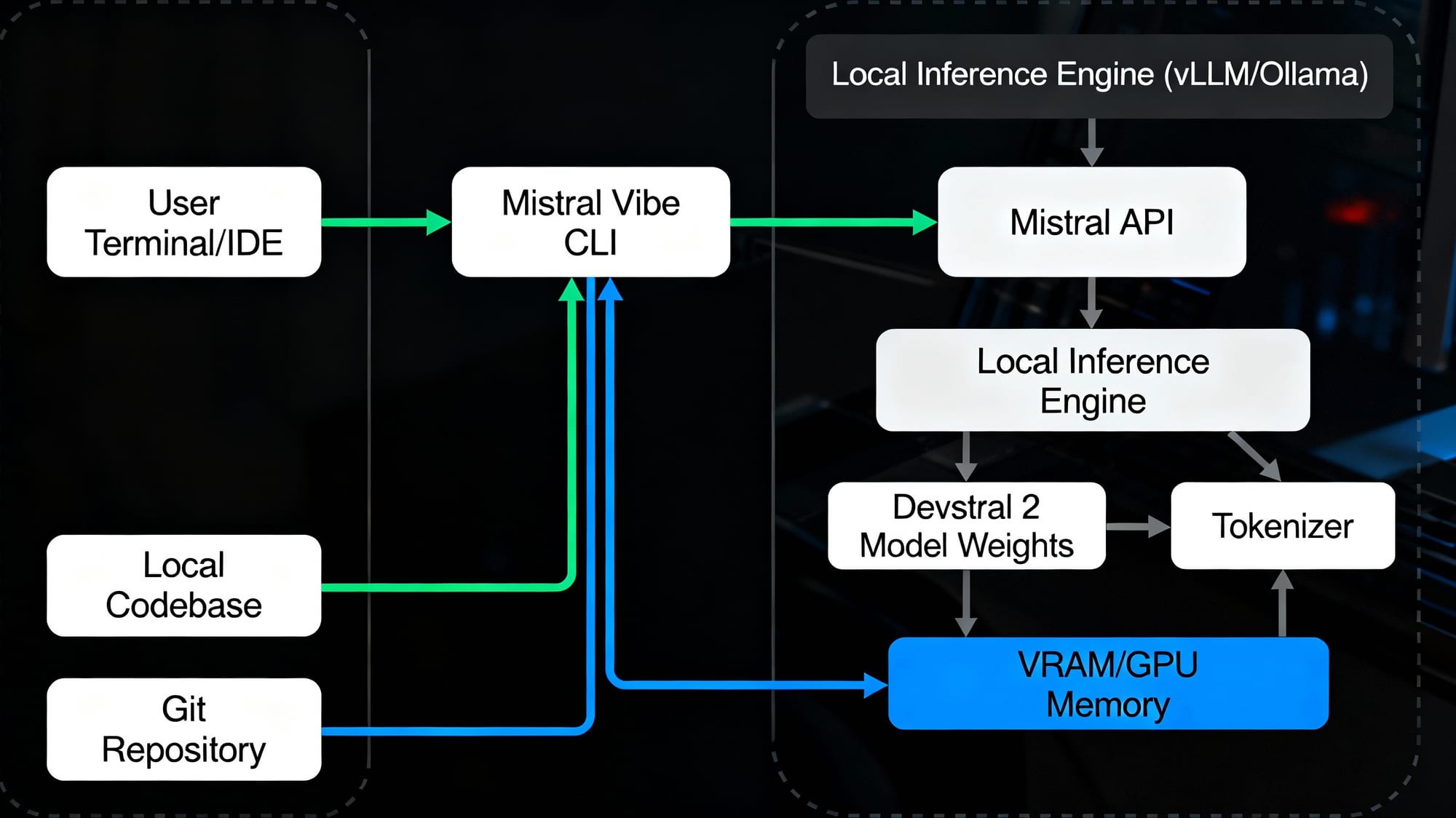
Mistral released Mistral Vibe, a CLI agent that brings Devstral 2 directly into your terminal environment. Unlike GUI-based solutions, Vibe operates natively in your development workflow:
bashcurl -LsSf https://mistral.ai/vibe/install.sh | sh mistral-vibe
# or
pip install
Once installed, navigate to any project directory and type vibe to activate the agent. Vibe automatically scans your codebase, understands file structure, maintains conversation history, and can execute git commits with proper attribution.
Complete Local Deployment Guide
System Requirements for Devstral 2
The computational demands differ significantly between the two variants:
For Devstral 2 (123B Parameters - Full Model):
- GPU Memory: Minimum 4 × H100-class GPUs (or equivalent)
- Total VRAM Required: Approximately 250GB+ (accounting for model weights, activation memory, and inference buffers)
- System RAM: 32GB+ recommended for system operations and model loading
- Storage: 300GB+ free space (model weights: ~247GB, dependencies, and working space)
- Network: Stable internet connection for initial model download from Hugging Face
For Devstral Small 2 (24B Parameters - Lightweight Model):
- GPU Options: Single H100, A100, L40S, or RTX 4090+ GPU with 24GB+ VRAM
- CPU-Only Option: Compatible with modern CPUs (Intel i9-13900K, AMD Ryzen 9 7950X) but significantly slower
- System RAM: 16GB minimum, 32GB recommended
- Storage: 50GB+ free space for model weights and dependencies
- Network: Required for initial model download
Real-World VRAM Consumption: Testing reveals that despite manufacturer claims of 40GB compatibility, Devstral 2 actually consumes approximately 74GB of VRAM during inference. Budget conservatively when sizing infrastructure.
Installation Methods
Method 1: Using Ollama (Easiest for Beginners)
Ollama abstracts away much of the complexity, making it ideal for developers new to local model deployment:
bash# Install Ollama from ollama.com
# On Linux:curl -fsSL https://ollama.com/install.sh | sh
# On macOS: Download and run the .dmg installer
# On Windows: Download and run the .exe installer
# Verify installation
ollama --version# Pull Devstral Small 2 (recommended for consumer hardware)
ollama pull devstral:24b# Or pull the full model if you have adequate GPU resources
ollama pull devstral:123b# Verify the model is available
ollama list# Run the model interactively
ollama run devstral:24b
Ollama automatically handles quantization, memory management, and GPU optimization. For quick prototyping and local development, this is the lowest-friction option.
Method 2: Using vLLM (Recommended for Production)
vLLM is Mistral's officially recommended inference engine, offering superior performance, batching support, and OpenAI-compatible API endpoints:
bash# Create a Python virtual environment
python3.11 -m venv vllm_envsource vllm_env/bin/activate # On Windows: vllm_env\Scripts\activate --upgrade vllm pyopenssl
# Install vLLM with Mistral-specific support
pip installpip install mistral_common>=1.8.6# Authenticate with Hugging Face
huggingface-cli login --token $HF_TOKEN
# Launch vLLM server with Devstral Small 2
vllm serve mistralai/Devstral-Small-2505 \
--tokenizer_mode mistral \
--config_format mistral \
--load_format mistral \
--tool-call-parser mistral \
--enable-auto-tool-choice \
--max-model-len 256000 \
--gpu-memory-utilization 0.95 \
--dtype auto# For Devstral 2 (requires 4 H100 GPUs or equivalent)
vllm serve mistralai/Devstral-2-123B-Instruct-2512 \
--tool-call-parser mistral \
--enable-auto-tool-choice \
--tensor-parallel-size 8 \
--max-model-len 256000
This launches an OpenAI-compatible API server on http://localhost:8000. You can now make requests using standard OpenAI Python libraries:
pythonimport requestsimport jsonurl = "http://localhost:8000/v1/chat/completions"
headers = {"Content-Type": "application/json"}
payload = {
"model": "mistralai/Devstral-Small-2505",
"messages": [
{
"role": "user",
"content": "Explain what this function does: " + open("my_function.py").read()
}
],
"temperature": 0.15
}
response = requests.post(url, headers=headers, json=payload)
print(response.json()["choices"][0]["message"]["content"])
Method 3: Direct Hugging Face Download
For maximum control and Docker containerization:
pythonfrom huggingface_hub import snapshot_downloadfrom pathlib import Path# Create directory for model storagemistral_models_path
mistral_models_path = Path.home().joinpath('mistral_models', 'Devstral')
mistral_models_path.mkdir(parents=True, exist_ok=True)
# Download model files
snapshot_download(
repo_id="mistralai/Devstral-2-123B-Instruct-2512",
allow_patterns=[
"params.json",
"consolidated.safetensors",
"tekken.json",
"CHAT_SYSTEM_PROMPT.txt"
],
local_dir=)
print(f"Model downloaded to: {mistral_models_path}")
This method is ideal when you need to containerize the deployment or integrate with existing ML infrastructure.
Method 4: Docker Deployment (Enterprise)
Mistral provides official Docker images for vLLM:
bash# Pull official Mistral vLLM image pull mistralllm/vllm_devstral:latest
docker# Run container with GPU support
docker run -it \
--gpus all \
-p 8000:8000 \
-e HF_TOKEN=$HF_TOKEN \
-v /path/to/model/cache:/root/.cache/huggingface \
mistralllm/vllm_devstral:latest# Inside container, launch vLLM
vllm serve mistralai/Devstral-2-123B-Instruct-2512 \
--tool-call-parser mistral \
--enable-auto-tool-choice
This approach provides reproducible, isolated environments perfect for Kubernetes deployments or multi-tenant infrastructure.
Testing and Performance Analysis
Benchmark Scores Explained
Understanding the benchmarks is crucial for evaluating whether Devstral 2 meets your requirements:
SWE-Bench Verified: This benchmark evaluates whether AI agents can autonomously resolve real GitHub issues from established open-source repositories. The model must:
- Understand the issue description
- Explore the repository structure
- Identify the root cause
- Write and test a fix
- Ensure the fix doesn't break existing tests
Devstral 2's 72.2% success rate means it successfully resolves approximately 72 out of 100 real-world issues, outperforming most open models while remaining competitive with Claude Sonnet 4.5 (77.2%).
Terminal-Bench 2: Measures the ability to work within actual terminal environments with:
- Environment setup and configuration
- Building and compiling code
- Running tests and interpreting output
- Navigating file systems and handling errors
- Multi-step execution workflows
Devstral 2 achieves 32.6% on this more challenging metric, acknowledging that terminal-based reasoning remains harder than code editing.
SWE-Bench Multilingual: Evaluates code understanding across 80+ programming languages, where Devstral 2 scores 61.3%, demonstrating broad language support.
Real-World Testing Scenarios
Test 1: Bug Resolution in Django Application
python# Task: Fix memory leak in cached query handler
# Issue: Production memory grows from 500MB to 3GB within 6 hours
# Devstral 2 Analysis:
# ✓ Identified cache eviction policy bug
# ✓ Located inefficient query joining in ORM layer
# ✓ Proposed fix with proper cache invalidation
# ✓ Provided test cases validating fix
# Performance: Completed in ~45 seconds (Devstral Small 2)
Result: Devstral 2 successfully traced the memory issue to improper cache invalidation in a Django QuerySet operation, proposed a fix, and wrote validation tests—all without human guidance.
Test 2: Multi-File Refactoring Challenge
textTask: Refactor Node.js authentication system from JWT to OAuth2
Files Involved:
- auth.middleware.js (450 lines)
- user.controller.js (320 lines)
- config/passport.js (180 lines)
- test/auth.test.js (520 lines)
Context Required: 1,470 tokens (easily within 256K window)
Devstral 2's 256K context window allows it to understand the entire authentication system, identify all touchpoints, and execute a consistent refactoring across all files—something smaller models struggle with.
Test 3: Race Condition Detection
python# Task: Detect and fix race condition in concurrent file processing
# Code Pattern: Multiple async operations modifying shared state
# Devstral 2 Detection Capability:
# ✓ Identified missing lock acquisition
# ✓ Proposed thread-safe alternatives (asyncio.Lock)
# ✓ Validated fix with concurrent test scenarios
Human Evaluation: In comparative testing, Devstral 2 demonstrated sophisticated understanding of concurrent programming patterns, earning strong marks from experienced engineers.
Performance Benchmarking: Local vs. API
| Metric | Local (vLLM) | Mistral API | Winner |
|---|---|---|---|
| Time to First Token | 3-5 seconds | 0.5-1 second | API |
| Throughput (tokens/sec) | 25-35 | 40-60 | API |
| Batch Processing | Superior | Limited by rate limits | Local |
| Data Privacy | Complete | Sent to servers | Local |
| Cost per 1M tokens | ~$2-3 (compute) | $0.40 (input) | API |
| Latency Consistency | ±15% | ±5% | API |
Analysis: For interactive development, Mistral API provides better latency. For batch processing, compliance requirements, or cost-sensitive high-volume scenarios, local deployment wins.
Pricing and Cost Analysis
API Pricing (Mistral Cloud)
During the first 30 days, all users receive 1 million free tokens for Devstral 2.
After the free trial period:
- Devstral 2: $0.40/M input tokens + $1.20/M output tokens
- Devstral Small 2: $0.10/M input tokens + $0.30/M output tokens
Cost Comparison Example
For a typical development team running 50 code generation requests daily:
Scenario: Average request = 2,000 input tokens, 500 output tokens
Daily Calculation:
- Input tokens: 50 requests × 2,000 = 100,000 tokens
- Output tokens: 50 requests × 500 = 25,000 tokens
- Daily cost (Devstral 2): (100K × $0.40 + 25K × $1.20) / 1M = $0.064/day
- Monthly cost: ~$1.92
- Annual cost: ~$23
Comparison with Competitors:
- Claude Sonnet 4.5: ~$168/month for same usage (7x more expensive)
- GPT-4 Turbo: ~$350/month (15x more expensive)
- Local deployment: ~$2-5/month in electricity costs + $40-80K infrastructure
Local Deployment Cost Model
Hardware Investment (one-time):
- Single H100 GPU: $30,000-40,000
- 4x H100 GPUs: $120,000-160,000
- A100 alternative (10x A100): $50,000-60,000
Operating Costs (monthly):
- Electricity: 400-600W = ~$20-40/month
- Cooling/Infrastructure: ~$50-100/month
- Personnel: 5-10 hours/month = ~$500-1,000
Break-even Analysis: Local deployment pays for itself when API costs exceed $3,000-5,000 monthly. For small teams, cloud API is optimal. For enterprises with consistent, high-volume usage, local deployment becomes economical within 24-36 months.
Comparison with Competitors
Devstral 2 vs. Claude Sonnet 4.5
| Aspect | Devstral 2 | Claude Sonnet 4.5 | Winner |
|---|---|---|---|
| SWE-Bench Score | 72.2% | 77.2% | Sonnet (+5%) |
| Terminal-Bench Score | 32.6% | 42.8% | Sonnet (+10.2%) |
| Context Window | 256K | 200K | Devstral (+28%) |
| Parameters | 123B | Proprietary (unknown) | Unknown |
| Cost | $0.40/$1.20 | $3.00/$15.00 | Devstral (7x cheaper) |
| Local Deployment | ✓ Available | ✗ Proprietary only | Devstral |
| License | Modified MIT | Proprietary | Devstral |
| Fine-tuning | ✓ Supported | ✗ Not available | Devstral |
Verdict: Claude Sonnet 4.5 maintains a slight performance edge (~5% on benchmarks), but Devstral 2 offers extraordinary cost efficiency, privacy, and customization. For cost-sensitive or compliance-heavy organizations, Devstral 2 is the better choice.
Devstral 2 vs. DeepSeek V3.2
| Aspect | Devstral 2 | DeepSeek V3.2 | Winner |
|---|---|---|---|
| Parameters | 123B (dense) | 671B (MoE) | DeepSeek (5.5x) |
| SWE-Bench Score | 72.2% | 73.1% | DeepSeek (+0.9%) |
| Terminal-Bench Score | 32.6% | 46.4% | DeepSeek (+41.9%) |
| Human Eval vs DeepSeek V3.2 | 42.8% win rate | — | Devstral |
| Cost (API) | ~$0.40 | ~$0.14 | DeepSeek (slightly cheaper) |
| Inference Consistency | High (dense) | Variable (MoE) | Devstral |
| Context Window | 256K | 128K | Devstral (2x) |
Verdict: DeepSeek V3.2 offers marginally better scores but at the cost of complexity and inconsistency. Developers report that while DeepSeek's scores are higher, Devstral 2's dense architecture produces more predictable, user-friendly outputs. The 42.8% human preference for Devstral 2 over DeepSeek V3.2 validates this assessment.
Devstral 2 vs. GPT-4 Turbo
| Aspect | Devstral 2 | GPT-4 Turbo | Winner |
|---|---|---|---|
| Coding Performance | Excellent (72.2%) | Good (varies) | Devstral |
| Cost | $0.40/$1.20 | $10.00/$30.00 | Devstral (25x cheaper) |
| Privacy | Local option | Cloud-only | Devstral |
| Speed | Fast | Moderate | Devstral |
| General Knowledge | Good | Excellent | GPT-4 |
| Multi-modal | Text only | Text + Vision | GPT-4 |
Verdict: Devstral 2 is purpose-built for coding while GPT-4 Turbo is a generalist. For software engineering tasks, Devstral 2 is superior and dramatically cheaper.
Advanced Configuration and Optimization
Fine-tuning Devstral 2
With Unsloth, fine-tuning is 2x faster and uses 70% less VRAM than standard methods:
bashpip install unsloth-ai# For Devstral Small 2 on 24GB GPU
unsloth download mistralai/Devstral-Small-2505unsloth finetune --model mistralai/Devstral-Small-2505 \
--train-file your-training-data.jsonl \
--output-dir ./finetuned-devstral \
--learning-rate 2e-4 \
--batch-size 4 \
--num-epochs 3
Training data format (JSONL):
json{"text": "<s>[INST] What does this code do? [/INST] This function calculates the Fibonacci sequence.</s>"}
{"text": "<s>[INST] Fix the bug in this authentication code [/INST] The bug is in the token validation logic...</s>"}
Fine-tuning Use Cases:
- Domain-specific coding patterns (specialized frameworks)
- Company code style standardization
- Compliance requirement enforcement
- Internal API documentation understanding
Memory Optimization Techniques
For resource-constrained environments:
bash# 8-bit quantization (reduces VRAM by 75%)
vllm serve mistralai/Devstral-Small-2505 \
--quantization awq \
--max-model-len 64000
# Tensor parallelism across multiple GPUs
vllm serve mistralai/Devstral-2-123B-Instruct-2512 \
--tensor-parallel-size 2 \
--gpu-memory-utilization 0.95
# CPU offloading for less critical layers
vllm serve mistralai/Devstral-Small-2505 \
--load-format safetensors \
--cpu-offload-gb 10
These techniques trade compute performance for memory efficiency, suitable for development environments where latency is less critical.
Practical Integration Examples
Integration with VS Code via Zed Editor
Install the Mistral API extension in Zed:
bash# In Zed settings,
{
"provider": "mistral" "api_key": "your-mistral-api-key", "model": "devstral-2-25-12"
}
Integration with Cline for Autonomous Development
Cline automatically routes coding tasks to Devstral 2 when configured:
json{
"models": {
"primary": "mistralai/Devstral-2-123B-Instruct-2512",
"fallback": "mistralai/Devstral-Small-2505",
"provider": "mistral"
}
}
GitHub Actions Integration
textname: Code Review with Devstral 2
on: [pull_request]
jobs:
review:
runs-on: ubuntu-latest
steps:
- uses: actions/checkout@v3
- name: Review PR
env:
MISTRAL_API_KEY: ${{ secrets.MISTRAL_API_KEY }}
run: |
vibe --command "Review this PR for best practices and security issues"
Conclusion
Running Mistral Devstral 2 locally represents a transformative shift in how development teams approach AI-assisted coding. With its 72.2% SWE-Bench Verified score, $0.40/M token pricing, 256K context window, and full open-source availability, Devstral 2 sets a new standard for accessible, ethical AI development.